How to Use Cutting CALC
Cutting CALC is a cutting optimization calculator. When you need to cut one stock bar into many required lengths, it helps decide which pieces should go into each stock bar to reduce waste. It is useful for pipe, square tube, wood, aluminum profile, round bar, and other length-based cutting work.
Quick Start
2000-4, 1200-4 for length and quantity.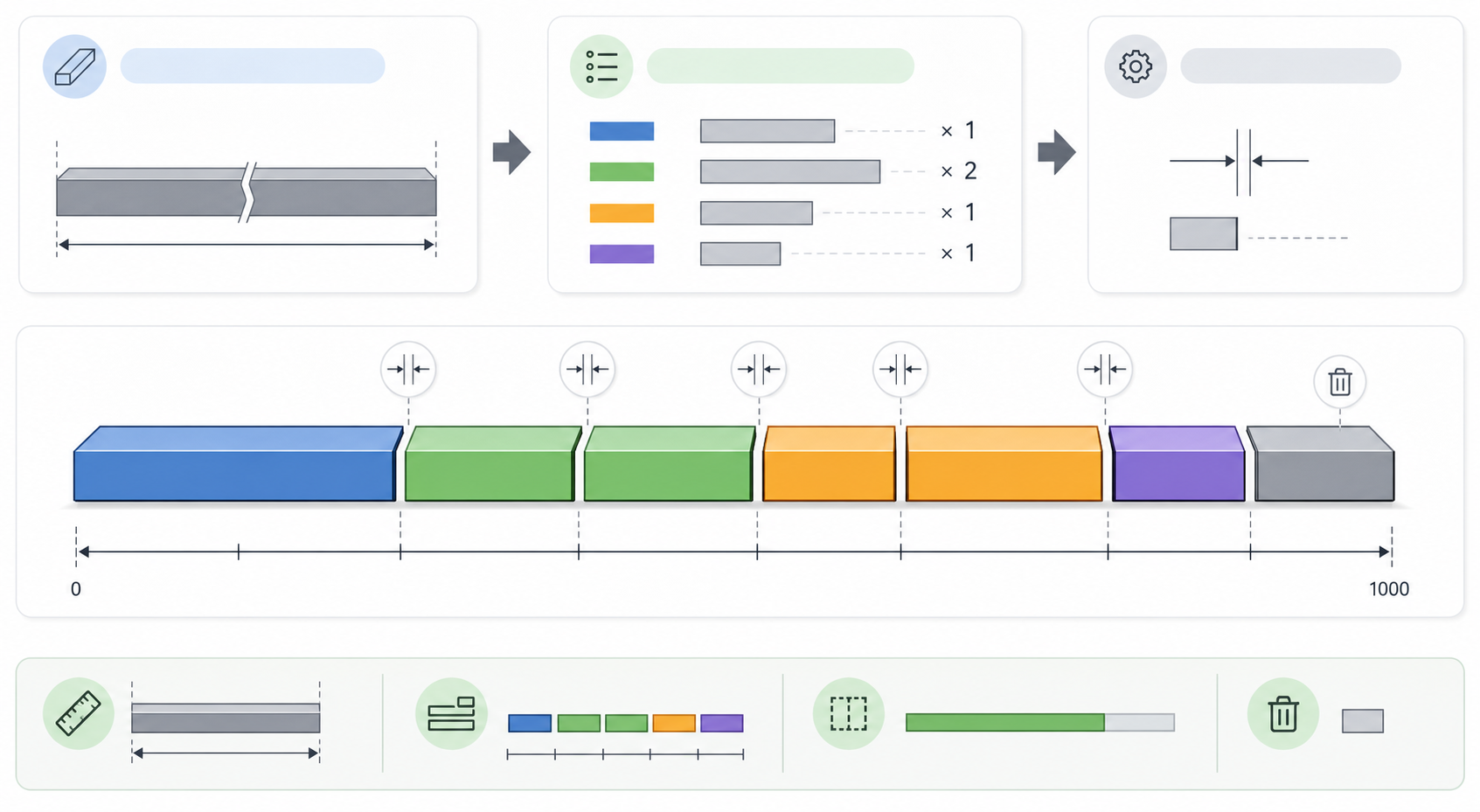
Basic Concepts
6500.stock - 2 x margin.Piece Input
The most common format is length-quantity. Separate multiple items with commas or line breaks.
Comma-separated input
2000-4, 1200-4, 1000-2Line-by-line input
2000-4
1200-4
1000-2
If quantity is omitted, it is treated as 1.
450
800-2Using Excel or CSV
When pasting from Excel, use length, quantity, and label columns. The label is optional.
1200    3    A-Section
800     2    B-Section
When uploading a CSV file, the first row should look like this.
SIZE,COUNT,LABEL
1200,3,A-Section
800,2,B-Section
When should I use offcut carryover?
Offcut carryover adjusts the arrangement to avoid awkward leftover lengths. For example, if 200-450 mm leftovers are hard to reuse in your shop, enter that range so the calculator tries to avoid it.
- ON: ON: rearranges pieces to avoid the selected leftover range.
- OFF: OFF: focuses on filling stock efficiently without the carryover rule.
Reading the Results
| Item | Meaning |
|---|---|
| Board quantity | The number of stock bars required. |
| Piece quantity | The total number of placed cut pieces. |
| Used length | The actual used length, including piece lengths and kerf. |
| waste | Length remaining after cutting. |
| Yield | Used length divided by total usable length. Higher yield means less material waste. |
Example
Assume the following conditions.
stock: 6500
margin: 15
kerf: 3
Required pieces: 2000-4, 1200-4, 1000-2
The usable length is 6500 - 2 x 15 = 6470 mm. The calculator places pieces and kerf within 6470 mm, then shows the cut list and remaining waste for each stock bar.
Before Cutting
- Check that the real stock length matches the input.
- Check that kerf matches your saw blade or cutting machine.
- Use margin if both ends must be trimmed.
- Print the result or export CSV to use it as a shop-floor work sheet.